



Same data, same server, very different bill
We ran four SEO tasks through SV’s MCP server, its CLI and its REST API on November 19, 2026. All three call the same API, so the data and the server-side work are identical. What changed was how much text reached the agent and how many steps it had to run itself.
The biggest gap was output size. One keyword-research result came back as about 53,000 tokens through MCP or the raw API. Through the CLI, filtered before the agent read it, the 20 rows the agent needed took about 650.
The second gap was loops. An async GEO audit took one CLI command, but 48 API calls with a polling loop we wrote ourselves.
Why this question, and what the existing benchmarks miss
MCP versus CLI became one of the loudest arguments among agent builders this year. The most-cited numbers come from a Scalekit test that Firecrawl wrote up. GitHub tasks run through the gh CLI used 4 to 32 times fewer tokens than through GitHub’s MCP server, and the CLI runs succeeded 100% of the time against 72% for MCP (Firecrawl).
Those tests use developer tools. SEO work is different: results are large tables, many tools run asynchronously, and AI-visibility checks have to be sampled more than once. SV ships all three interfaces on one shared core, so we could run identical SEO tasks through each and isolate the interface.
The test
We ran four tasks through each interface:
|
Task |
SV tool |
Why it’s in the test |
|
Health check of seovendor.co |
Preliminary Audit |
A small, quick result |
|
Keyword research for a local HVAC company |
Better Keywords |
A large table: 297 keywords |
|
AI visibility on ChatGPT, 4 samples |
RankLens |
A run that needs repeat calls |
|
GEO audit, quick scan |
GEO Audit |
An async task that runs for minutes |
For MCP we used Claude connected to SV’s hosted server. For the CLI and the API we used a Python script and a test API key. We logged calls, time and the size of each result; tokens are estimated at four bytes each.
Two caveats. The keyword request had run earlier that day, so the server returned a cached copy; we compare its size, not its speed. And the test key’s plan ran fewer GEO audit modules than the MCP account, so GEO result sizes reflect the plan, not the interface.
One result, eight ways to receive it
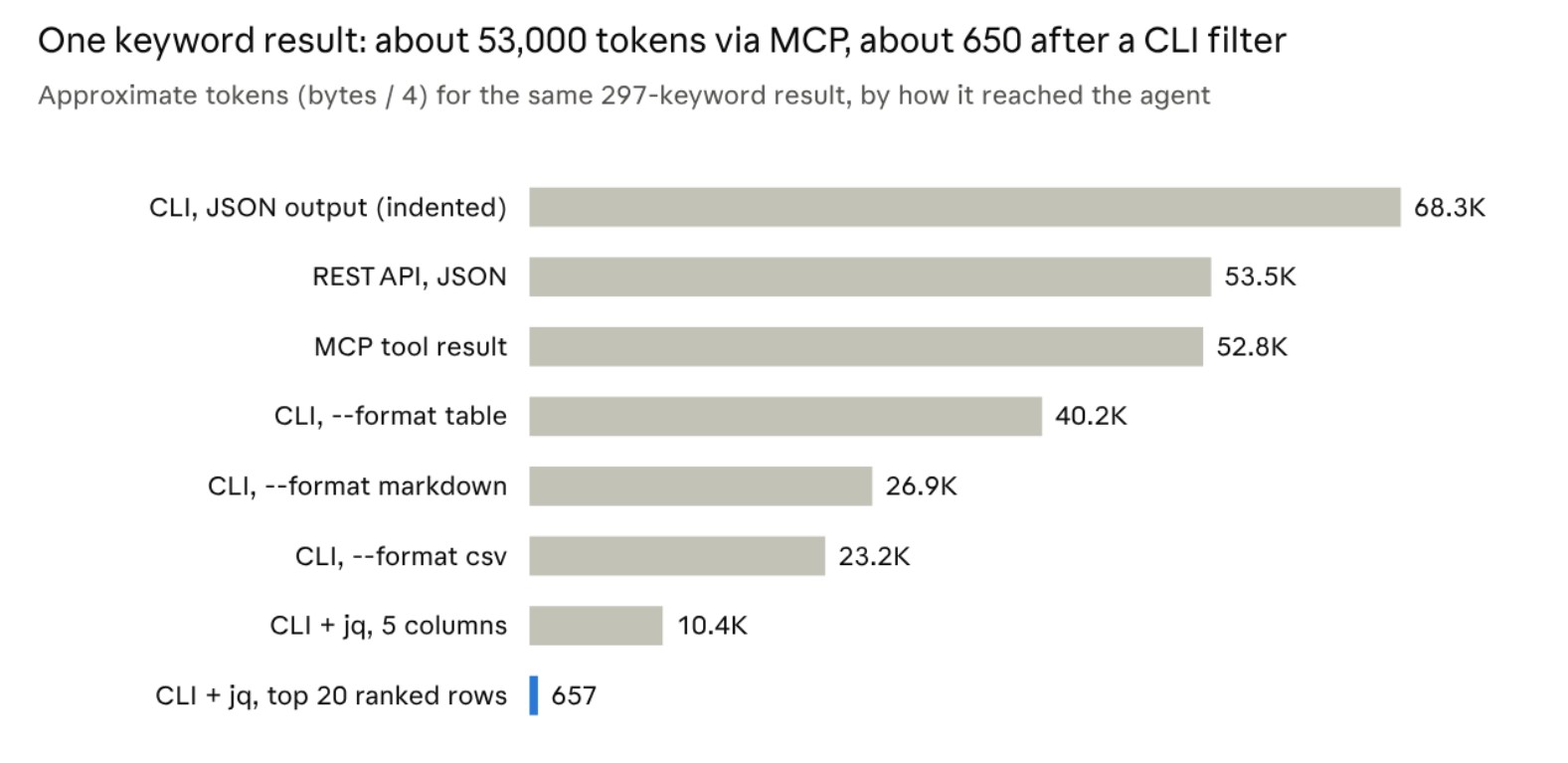

Better Keywords result, 297 rows · measured November 19, 2026 · tokens estimated at 4 bytes each
The interface doesn’t shrink a result; filtering before the agent reads it does. A shell makes that a one-line step, and SV’s MCP tools have no option for it yet.
Results: same answers, different work for the agent
|
Task |
MCP |
CLI |
REST API |
|
Health check |
1 call, 4.3 s server, 4.2 KB |
1 command, 6.4 s, 5.4 KB |
1 request, 5.1 s, 4.2 KB |
|
Keyword research |
1 call (sizes in the chart) |
1 command (sizes in the chart) |
1 request (sizes in the chart) |
|
RankLens, 4 samples |
2 calls* |
2 commands, 37.9 s |
2 requests, 39.1 s |
|
GEO audit, quick scan |
4 calls in our run, about 6.7 min |
1 command with –wait, 8.5 min |
48 requests including polling, 4.5 min |
CLI and API times are wall-clock on our machine; MCP times are server-side, because the host adds its own overhead. GEO audit times depend on the job queue, not the interface. *Two samples per call, as measured in our 8- and 16-sample MCP runs.
Three patterns stand out:
• Small results don’t care. The health check cost about the same everywhere. The CLI’s extra second is Python starting up.
• Repeat calls are the agent’s job in every interface. After the first RankLens call, each run returned a partial result showing 0% visibility. The second call finished it. Neither the MCP server nor the CLI repeats the call for you.
• Async is where the CLI wins. One –wait flag replaced a polling loop. Our own API loop also hit the rate limit once: SV accepts one request per second per key, and we fetched the result too soon after the last status check.
What each interface costs before the first call
An agent has to learn a tool before it can use it, and that reading costs tokens too.
• MCP: the host loads all 17 SV tool definitions, about 38 KB or 9,500 tokens. Some hosts load a definition only when the tool is needed, which cuts this sharply.
• CLI: the main help screen is 7.6 KB and each command’s help is 5.8 KB. The command help is generic, listing options for every tool, so an agent can’t tell which ones apply to the tool it’s calling.
• REST API: each tool’s definitions file runs 6 to 10 KB, and the agent also needs the endpoint and the way to pass the key.
MCP’s cost is paid once per session. It matters most for many short agent runs, such as a scheduled check across 40 clients.
Which to use when
Pick by who’s driving: a person in a chat, a scheduled agent, or your own software.
|
Interface |
Use it for |
Why it fits |
Watch out for |
|
MCP |
Analysis in Claude, Cursor or Codex by strategists and account managers |
Sign in once with OAuth, no key in prompts; the agent picks the tools |
Large results land whole in context; RankLens needs repeat calls; definitions load up front |
|
CLI |
Scheduled checks, batch jobs across client accounts, agents with a shell |
–wait handles async jobs; –format csv and shell filters shrink output before the agent reads it; profiles keep client keys apart |
Generic help text; about a second of startup per command; JSON output is indented and larger |
|
REST API |
Your own white-label portal, dashboards and integrations |
Full control, compact JSON, nothing to install |
You write the polling, the retries and the one-request-per-second pacing |
Many agencies will use two: MCP for the people asking questions, and the CLI or the API for the jobs that run on a schedule.
Setup for each interface
MCP. In Claude, add a custom connector with the URL https://mcp.seovendor.co and sign in to SV. Other MCP hosts take the same URL in their own config. In Claude Code, a project’s .mcp.json looks like this:
{“mcpServers”: {“sv-mcp”: {“type”: “http”, “url”: “https://mcp.seovendor.co”}}}
CLI. Install it, set the key, and let the shell trim the output before the agent reads it. This is the filter that turned the keyword result into about 2.6 KB:
pip install sv-cli
export SV_API_KEY=your-key
sv –format json keywords research –keyword “hvac repair [city]” –location “[City, ST]” –web https://example.com \
| jq -c ‘[.data[] | select(.rank > 0) | {keyword, volume, cpc, rank, relativeurl}] | sort_by(.volume // 0) | reverse | .[:20]’
For async tools, add –wait and the CLI polls until the job finishes:
sv –format json geo-audit create-task –url https://example.com –keyword “white label SEO” –scantype 1 –wait –no-progress
REST API. Every call is a POST with JSON in and JSON out, and the key travels as k in the body:
curl -s https://ai.seovendor.co/api/preliminaryaudit/ \
-H ‘Content-Type: application/json’ \
-d ‘{“action”:”analyze”,”URL”:”https://example.com”,”k”:”YOUR_SV_API_KEY”}’
In all three, repeat a multi-sample RankLens request until its result shows complete: 1. Full references: SV MCP, SV CLI.
FAQ
Is MCP or the CLI better for SEO agents? Neither wins outright. MCP is simplest for people working in a chat. The CLI is cheaper for scheduled and batch work, because the shell can trim output before the agent reads it.
Why does the same data cost more tokens through MCP? MCP puts the server’s full response into the agent’s context. With the CLI, the agent can filter rows and columns first: our keyword result went from about 53,000 tokens to about 650.
Do I need an API key for SV’s MCP server? Not for the hosted server. You sign in with your SV account, and the key is never shown to the AI model. The CLI and the REST API use a key.
Are failed calls charged? No. Successful calls spend SV points. Failed calls are free, and so are MCP’s task status and result checks.
Try all three on your own account
Grab an API key from your SV account, connect SV MCP at https://mcp.seovendor.co, and run one of your own client checks through each interface. The SV CLI and SV MCP docs cover setup.