


We’ve rolled out a major update to the SEO Vendor SEO AI Dashboard for national SEO campaigns, designed to help you understand something rankings alone can’t fully explain:
How visible you really are in search.
This update adds deeper visibility insights (beyond “blue link” positions), clearer keyword reporting, and more helpful on-page guidance so teams can interpret results faster.
These changes will appear for:
Local projects: A similar dashboard update is coming soon for local campaigns.
Rollout Timeline
We expect all existing national SEO campaigns to start appearing on the new dashboard starting now, with a full transition completed by: February 15th, 2026
If you manage multiple campaigns, you may see some projects transition earlier than others during the rollout window.
DEMO READY: Login in here to the Campaign page and go to the demo.com project to view a demo of the new dashboard!
The Big Shift: Rankings + Visibility

Historically, dashboards focus mainly on “position.” In 2026, search visibility is bigger than that.
Your site can show up in multiple ways on the same search results page:
- Standard organic results
- AI Overviews
- “People Also Ask”
- Reviews, videos, images
- Local/map elements
…and more.
So we’ve improved the dashboard to reflect that real-world visibility.
What’s New (At a Glance)
Here’s a simple comparison of what the dashboard now includes for national projects:
| Area | Before | 2026 Dashboard Update |
|---|---|---|
| Visibility beyond rankings | Limited | Tracks visibility from multiple search result placements |
| SERP features | Often displayed as a single item per keyword | Consolidates and displays all features earned per keyword |
| Keyword tables | Rankings-focused | Adds SERP Features, Search Intent, and Click Share columns (when available) |
| Value metrics | Based mainly on rank positions | Adds additional value credit for SERP Features (excluding “Organic” to avoid double-counting) |
| Help & definitions | Minimal | Adds help icons and clearer explanations across sections |
New Visibility Sections You’ll See
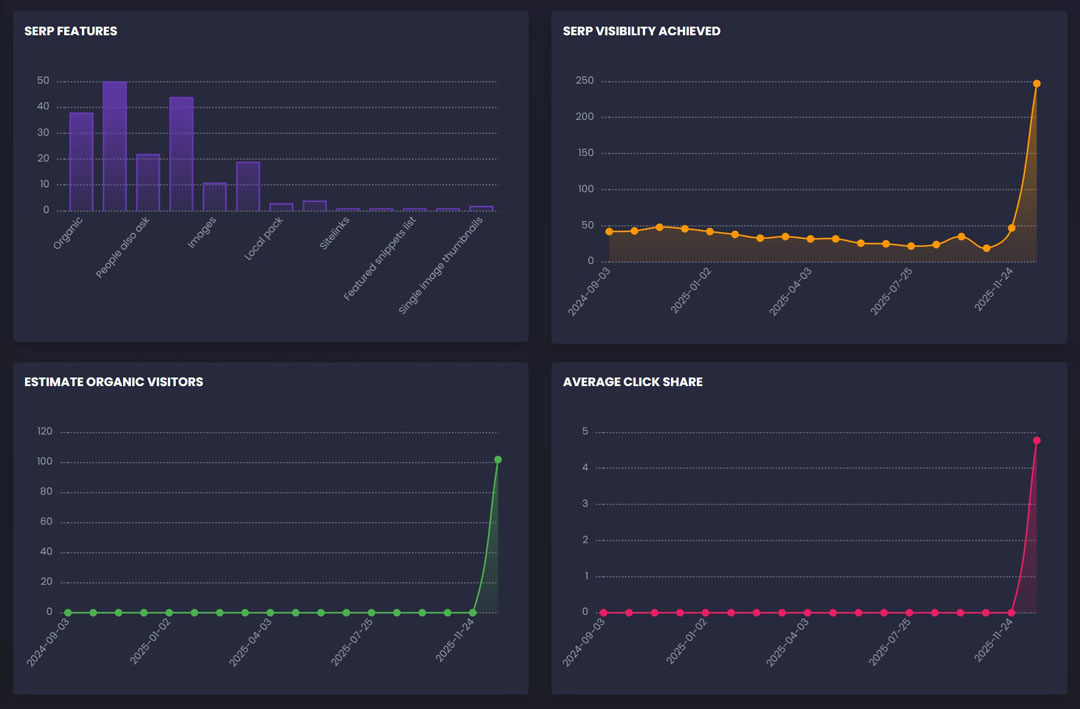
SERP Features
This chart summarizes how often your site appears in different search result features.
You’ll see items like:
- AI-style summaries (AIO)
- People Also Ask
- Reviews
- Videos
- Images
- Featured snippets
- Sitelinks
- Local pack (when applicable)
Important improvement:
We ignore blank values or “-” so the dashboard doesn’t count “non-features” as real visibility.
SERP Visibility Achieved
This section answers: How much search “real estate” are we earning?
Instead of counting only rankings, visibility considers:
- Your organic placement plus
- Any additional feature placements your site earns for the same keyword
This makes the trendline more representative of what a searcher actually sees.
Estimated Organic Visitors
This chart shows estimated traffic potential based on visibility and ranking performance trends for top 20 positions.
It’s meant to be directional—helpful for seeing whether your campaign’s visibility is moving up or down over time.
Average Click Share
Click Share represents the estimated share of clicks your listing may earn based on how (and where) it appears.
This helps answer:
- “Are we getting better placements that earn attention?”
- “Are we moving into results that people actually click?”
Keyword Tables Got Smarter
The Active Keywords and Past Keywords tables now provide more context so you can interpret performance faster.
Active Keywords (new columns)
When visibility data is available, Active Keywords includes:
| Column | What it means |
|---|---|
| SERP Features | Icons showing every search result feature your keyword earned (not just one) |
| Search Intent | A quick label of what the searcher is likely trying to do (learn, buy, compare, navigate) |
| Click Share | Estimated click opportunity associated with the keyword’s placement(s) |
| Google / Bing | Best earned rankings in each engine (including local variants where relevant) |
Past Keywords (expanded visibility context)
Past Keywords now shows historical visibility context where available—useful for understanding:
- which terms previously performed well
- which keywords earned features (not just rankings)
- which ones may be worth reactivating later
SERP Features Are Now Consolidated Correctly
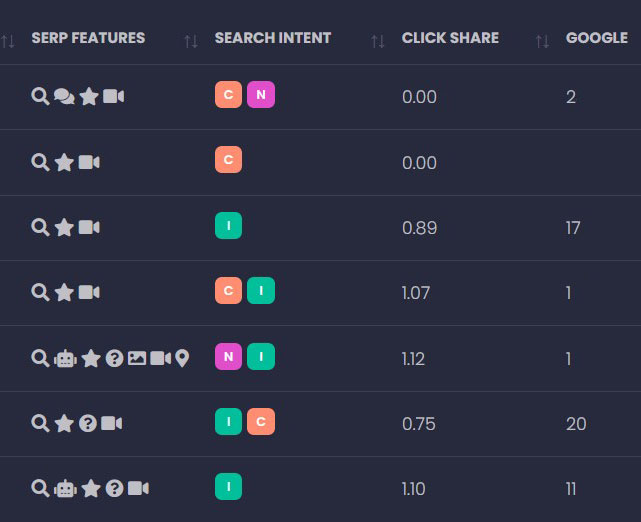

One of the most important updates is how SERP features are displayed for each keyword.
Previously, if a keyword had multiple data rows, the dashboard might only show one SERP feature.
Now:
- If a keyword earns multiple features, we consolidate them
- The dashboard shows all unique features as icons in the keyword table
Example:
- Keyword earns Organic + AI-style summary
- You’ll see icons for both in the SERP Features column
Rankings Value Metrics Are More Accurate Now
You’ll notice improvements to:
- Estimate Rankings Value
- Potential Rankings Value
These values are still driven by ranking tiers, but now include extra value credit for SERP Features (like reviews, videos, AI-style summaries, etc.).
Note: We do not add extra value for “Organic” in this add-on, because organic rankings are already included in the core ranking value calculation. This prevents double-counting.
More Help Icons, Better Explanations
We’ve added help icons throughout the dashboard (similar to the SEO Focus Controls help icon).
This means users can quickly understand:
- what each chart represents
- how to interpret it
- what the table columns mean
without needing a call or a guide.
What to Expect Next
National projects (i-SERIES National, S-SERIES, SC-SERIES, M-SERIES National):
Transition starts now and should be fully completed by February 15th, 2026.
Local projects:
A dashboard update for local campaigns is planned next, and we’ll announce it as soon as it enters rollout.
Want Help Interpreting Your New Dashboard?
If you’d like, your account manager can walk you through:
- what visibility means for your industry
- which SERP features are most valuable for your goals
- which keywords are earning attention vs. just rankings
As always, our goal is simple: make performance clearer, faster, and more actionable.