

Let the form fill run the audit
SV for Zapier lets a form fill, a new CRM deal or a weekly schedule start SV’s SEO and AI-visibility tools. The results then flow to the apps the agency already works in. We built two Zaps with it on November 19, 2026, and ran every SV step in Zapier’s editor.
Table of Contents
The simple steps worked as built. A health check and 297 keyword ideas for a local HVAC prospect came back as fields ready to map into an email, a sheet or a CRM.
Two jobs need more design. A RankLens step stops after two AI answers, so a 16-answer check takes eight steps. A GEO audit finishes minutes after the step that starts it. Below are both Zaps, what each step returned, and the guardrails that keep partial results out of client reports.
What SV for Zapier does
SV for Zapier adds 23 SV actions to Zapier, so any of the roughly 9,000 apps there can start an SEO or GEO job and pass the result on (Zapier listing). The integration is in beta and has no triggers yet. Every Zap starts in another app: a form, a CRM, a spreadsheet or a schedule.
|
Job |
SV actions |
What comes back |
|
Audit a site or page |
Run Preliminary SEO Audit, Run CORE Analysis, Analyze Content Quality |
A health score with per-check results; on-page signals for a URL and keyword; an E-E-A-T score |
|
Research keywords and competitors |
Research Keywords, Find Top Competitors, Find Topical Authority Topics |
Keyword ideas with volume, CPC and opportunity scores; the top 10 Google results; topic clusters |
|
Measure AI visibility |
Generate RankLens Report, Find RankLens Competitors, Start GEO Audit, Start Entity Research |
Brand visibility in AI answers; competing brands and their scores; a GEO audit; the entities five AI engines tie to a site |
|
Write content |
Generate SEO Content, Rewrite Content, Start Prose Content, Start SEO Image |
Titles, metas, ad copy and social posts; rewritten copy; long-form articles; images |
|
Plan the work |
Start SEO Strategy, Start SEO Mapping, Find Marketplace Services |
A strategy for a page and keyword; keywords mapped to pages, with cannibalization; SV services and packages |
Six jobs run in the background, so each comes as a pair: a Start action that launches it and a Get Result action that collects it. Every other action returns its result in the same step.
Zap 1: Audit every new lead automatically
This Zap runs when a lead lands in a list and gathers what an account manager needs before the first call. Our list was a Zapier table with three fields: website, keyword and city. The test lead was the HVAC contractor from Doc, with “AC repair” plus its city as the keyword.
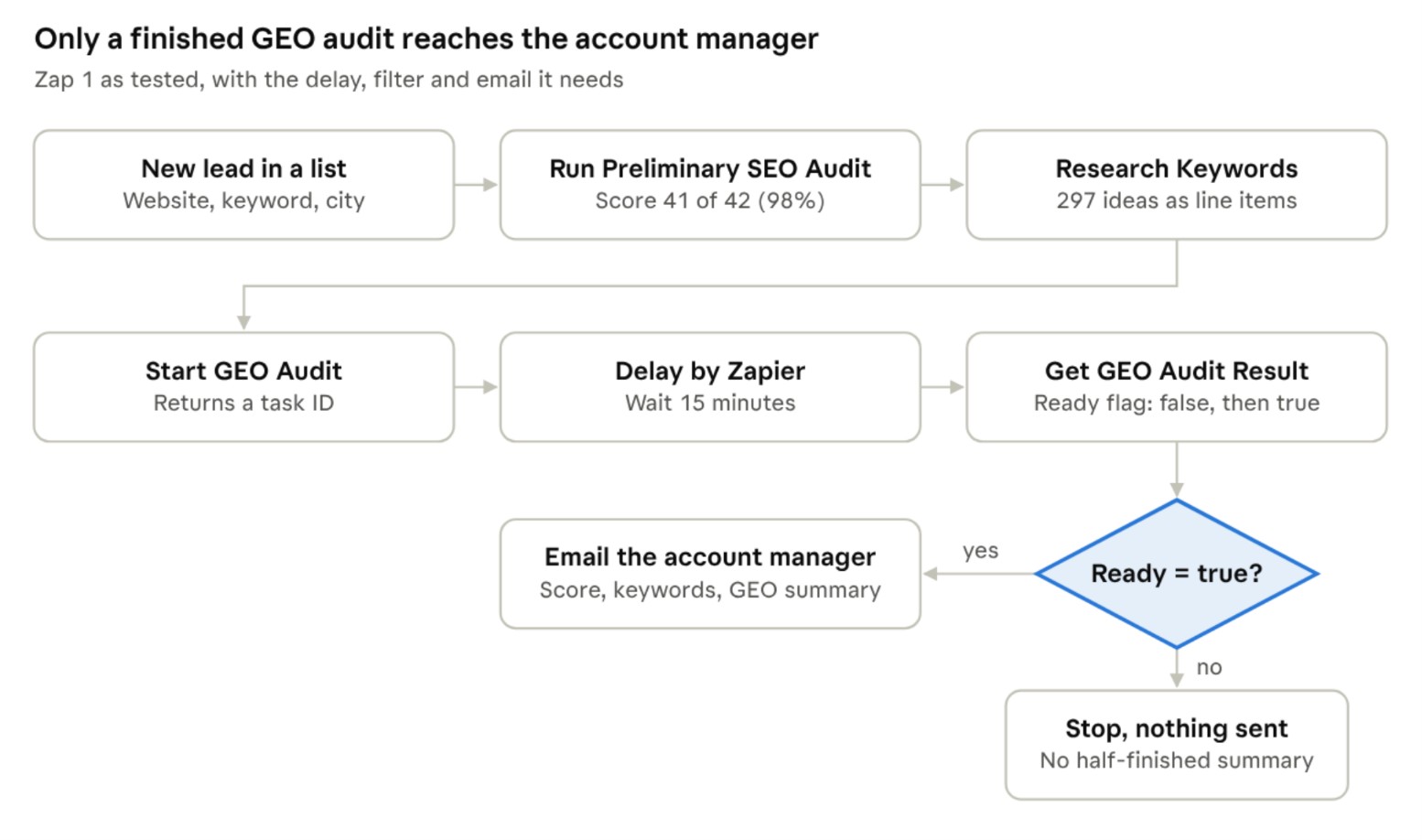
New-lead audit Zap · 8 steps, 1 filter · SV steps tested November 19, 2026
We ran the trigger and all four SV steps. The delay, the filter and the email are standard Zapier steps.
|
SV step |
What came back |
|
Run Preliminary SEO Audit |
A score of 41 of 42 (98%), plus a score, message and explanation for each check |
|
Research Keywords |
297 keyword ideas, as one comma-separated list and as line items with volume, CPC, intent and rank |
|
Start GEO Audit |
A task ID, the status “pending” and the nine audit modules it queued |
|
Get GEO Audit Result, about a minute later |
Ready: false, 60% complete, “Task is not complete yet.” |
|
Get GEO Audit Result, after the audit finished |
Ready: true, with the report as fields; the first module scored the site 91 across 49 pages |
The audit took 6.6 minutes, so the Zap waits 15 before collecting it.
Zap 2: Log AI visibility every week
This Zap asks ChatGPT the same question every Monday and logs how often the answers name the brand. We tested it on SV’s own brand for “white label SEO platform”, at four samples to keep the run short.
1. Schedule by Zapier: every week, Monday at 9:00 a.m.
2. SV, Generate RankLens Report: website, entity, brand name, AI engine ChatGPT (Latest), sample size 4X.
3. SV, Generate RankLens Report again, with identical inputs.
4. Filter by Zapier: only continue if Sampling Complete is 1.
5. Log the run: add a row to Google Sheets or Zapier Tables with the date, Appearance, Probability, Average Rank and Sampling Progress.
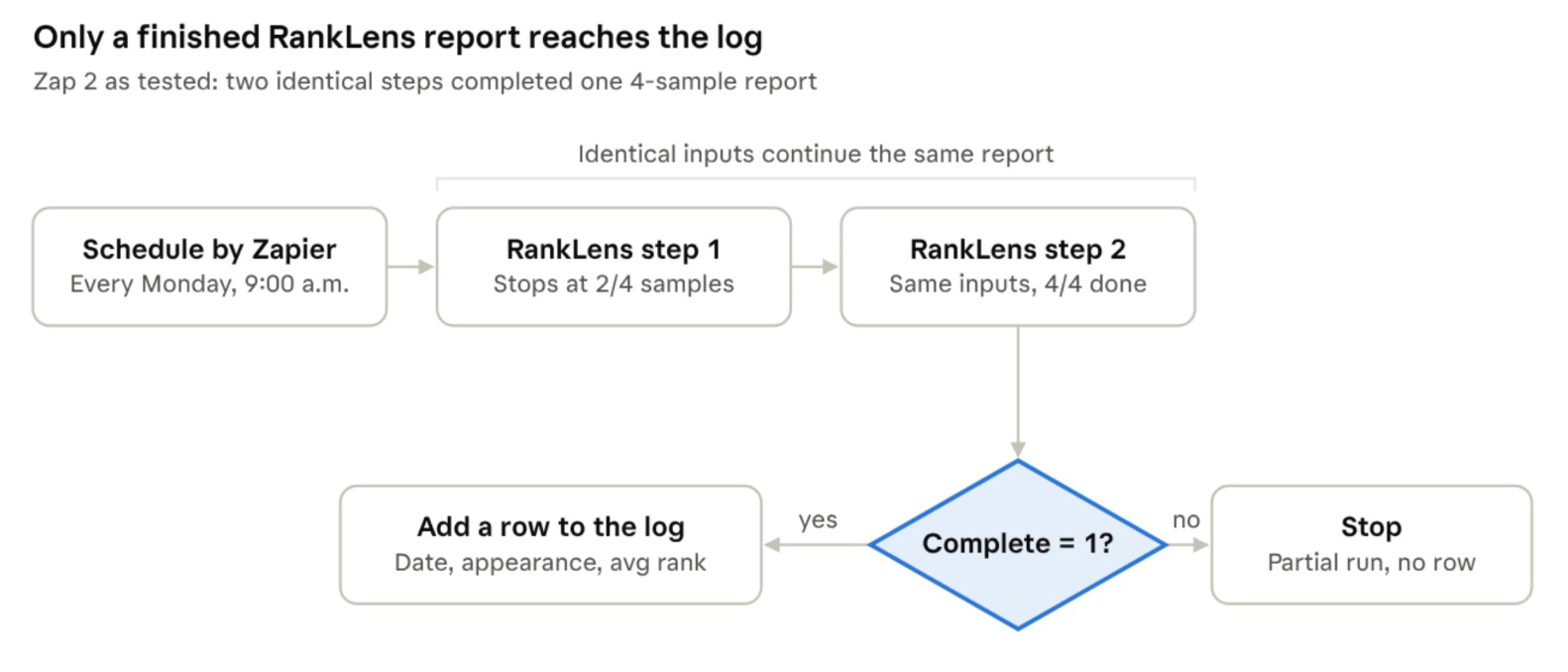
Weekly RankLens Zap · 4 samples per run, as tested November 19, 2026
We ran the schedule and both RankLens steps; the filter and the log row are standard Zapier steps. The first RankLens step stopped at two of four answers. The identical second step finished the same report, and both returned one RankLens Report ID.
|
Step |
Sampling Progress |
Sampling Complete |
Answers naming SV |
|
First RankLens step |
2/4 |
0 |
0 of 2 |
|
Second, identical step |
4/4 |
1 |
0 of 4 |
For the 16 samples per engine we recommend in Doc, chain eight identical RankLens steps. Each one counts as a Zapier task, while the filter costs none (Zapier).
Four things that trip SV Zaps up
• Partial RankLens runs. A Generate RankLens Report step stops after two AI answers, and its Sampling Progress field says so. Repeat the step with identical inputs until Sampling Complete is 1, and filter on that field before logging anything.
• Results that aren’t ready yet. Get GEO Audit Result succeeded while the audit was still running, with Ready set to false, so Zapier showed no error. Put a delay before each Get Result step and a filter on Ready after it. The other five Get Result actions also return a status, per their Zapier descriptions.
• A blank brand name. We left Brand Name empty in Start GEO Audit, and the report used the keyword as the brand. Map the business name into that field.
• Zapier’s 30-second limit. Zapier gives each app step 30 seconds to finish (Zapier). Our fresh keyword request and the first RankLens step each took more than 20 seconds, so watch Zap history for timeouts on those steps.
Where Zapier fits next to MCP, the CLI and the API
Zapier is the only SV interface that reacts to events in other apps without code. The other three suit different jobs, as our benchmark showed: Doc.
|
Interface |
Best for |
Watch out for |
|
Zapier |
A new lead, a new deal or a schedule, with results sent to about 9,000 apps |
30-second steps, one task per SV step, repeated RankLens steps |
|
SV MCP |
Questions asked in Claude, Cursor or Codex |
Large results land whole in the chat |
|
SV CLI |
Scheduled batch jobs across many clients |
Needs a machine with a shell |
|
REST API |
Your own portal, dashboards and integrations |
You write the polling, retries and pacing |
AI agents can also reach SV through Zapier’s own MCP server, where each successful tool call counts as two Zapier tasks (Zapier). Connecting SV’s MCP server directly avoids that cost.
Set up SV in Zapier
1. Create a Zap and choose its trigger: a form, a CRM, Zapier Tables or Schedule by Zapier.
2. Add an action, search for SV, and pick the action you need.
3. The first time, connect your SV account with your SV API key. Zapier keeps the connection for later Zaps.
4. Map fields from the trigger, such as the prospect’s website, keyword and city.
5. Test each step in the editor and check the output fields you’ll use downstream.
6. Publish. A Zap with more than one action step needs Zapier’s Pro plan to publish, though the free plan lets you build and test it.
FAQ
Does SV for Zapier have triggers? Not yet. The beta has 23 actions and no triggers, so every Zap starts in another app.
Which SV jobs take two steps in Zapier? Six jobs run in the background: GEO audits, entity research, Prose articles, SEO images, SEO strategies and SEO mapping. Each has a Start action and a Get Result action.
How many Zapier tasks does an SV Zap use? One for each SV step that succeeds. Our lead-audit Zap runs four SV steps, so four tasks before any email or CRM step.
Can AI agents use SV through Zapier? Yes, through Zapier’s MCP server or its SDK (Zapier listing). For work in a chat, SV’s own MCP server is the shorter path.
Build your first SV Zap
Connect SV in Zapier with your API key and start with the lead audit: a lead list or form as the trigger, then Run Preliminary SEO Audit and Research Keywords.
- Build Zaps with SV: all 23 actions are on the SV listing at zapier.com/apps/sv/integrations
- Use SV from an AI assistant: connect Claude, Cursor or another MCP client through Zapier MCP at zapier.com/mcp/sv