[email protected]
1-800-398-5212


SV tools Keyword-to-page mapping
Know what to improve next.
Match keyword groups to relevant URLs. Compare page scores, review potential keyword overlap, and turn your findings into a focused page improvement plan.
Already have an account? Sign in to your dashboard
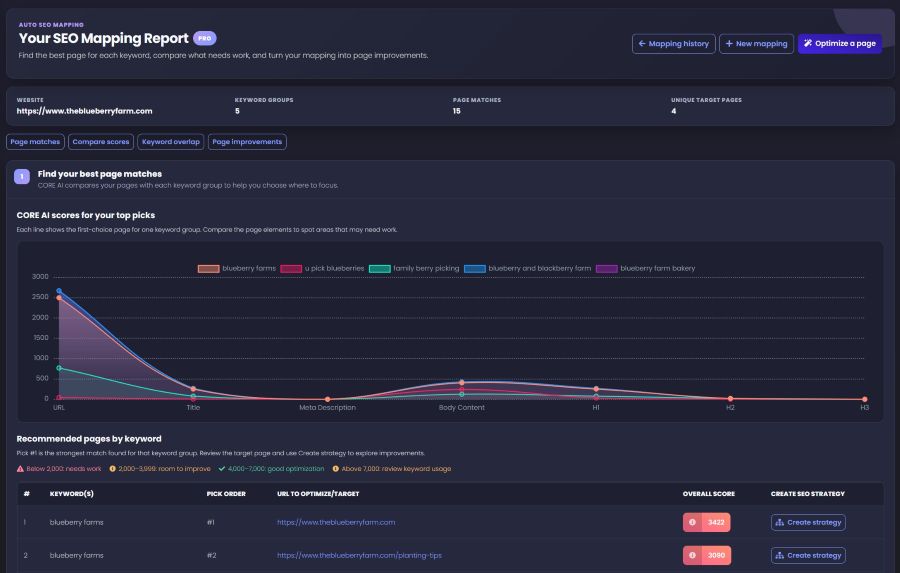
Example report shown in PRO view. Account features and usage may vary.
01 Find your page matches
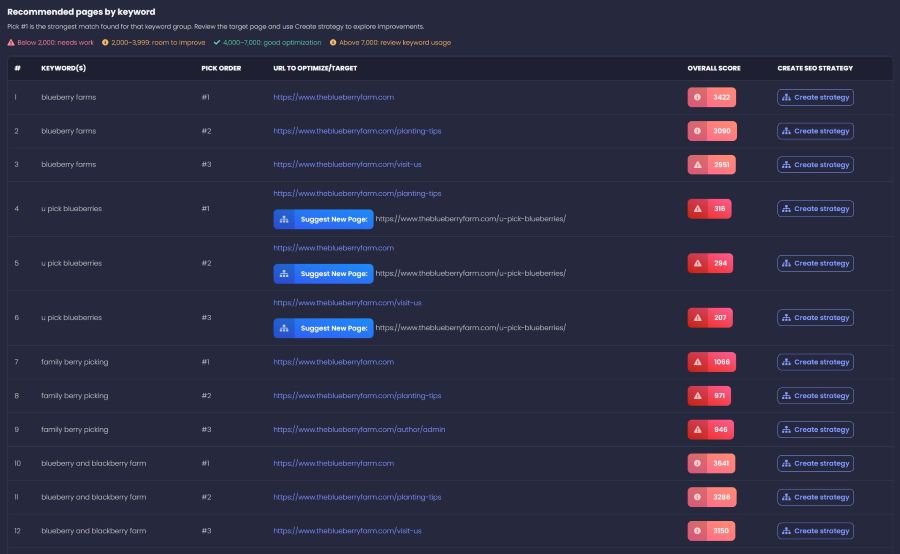
See your leading URL candidates together, rather than deciding one page at a time. Compare the pick order and overall scores, then choose where to focus.
02 Compare the details
Compare the elements of each candidate page before choosing a target. See where the title, copy, or headings need a closer look.

Use scores as review signals—not search rankings. Very high scores can also indicate over-optimization.
03 Check for competing pages
Compare similar pages with your primary target. Overlap charts, similarity percentages, and risk labels help you decide which URLs deserve a closer review.
A signal to investigate—not an instruction to delete, merge, or redirect a page.

04 Turn findings into improvements
Review current and suggested page titles, meta descriptions, H1s, and H2s side by side, with priorities to help organize the work.
Keywords sharing a target URL are grouped together, so you can review recommendations around the page you are improving.

Beyond the page edit
Move from a target page to its Topical Authority Plan. Choose a URL to optimize, generate page recommendations, or open the content options for its keyword group.

See it in action
Explore the report, then take a closer look at how keyword mapping fits into your optimization work.
Ready to explore your own keyword-to-page opportunities?
Create free accountPrefer hands-on implementation?
Explore SV’s managed campaigns for ongoing SEO execution. These are separate services, not features included with a free tool account.
A few useful answers
Page choices, scores, overlap, and what to do with the report.
Ask the SV teamSEO Mapping is SV’s keyword-to-page mapping tool. It helps you compare relevant URLs for a keyword group, inspect page-element scores, review possible overlap, and turn a selected page into an improvement plan.
Start with the ranked candidates, then compare their page-element scores and the purpose of each URL. Pick #1 is the strongest match found for that keyword group—not a prediction of a number-one search ranking.
The report breaks down URL, title, meta description, body content, H1, H2, and H3 scores. Use them to investigate weak areas rather than chasing a maximum total. The report also warns that very high scores can signal over-optimization.
The experimental keyword-overlap view compares pages with the primary target and displays similarity percentages and risk labels. Treat these as prompts for investigation, not proof that a page must be removed or redirected.
The recommended-pages view can show a suggested new-page URL. Review that opportunity alongside the existing candidates before deciding whether to improve a page or create a more focused one.
Review suggested page titles, meta descriptions, H1 and H2 headings, and their priorities. The report also includes a topical authority plan and actions for page recommendations and supporting content. Review generated copy before applying changes to your website.
Keyword mapping helps you decide which URL should target a keyword group. A topical content plan develops supporting topics around that target. The SEO Mapping report connects the two through its Topical Authority Plan and content actions.
Yes. You can create a free SV account to get started. The example report on this page shows a PRO view; check your dashboard for the features and usage available to your account.
Your next page decision starts here
Find your candidate URLs, compare the details, and decide what to improve.