Refresh
A clearer version
of the same page.
Rework a service description, product explanation, or page section. Bring the relevant keyword and destination page into the brief.
Existing page copyA more focused rewrite


SV SEO GPT workspace
Keep the idea.
Improve the copy.
Give existing content a stronger next version. Rewrite, repurpose, or translate your copy with the keyword, page, and brand context that makes it yours.
Already with SV? Open Content Transformer
Watch the workflow, then explore the current workspace below.
Open video in a new tabThe transformation brief
Paste the content you want to improve. Choose a new format or let the tool detect one, then add the context and output settings that fit the job.
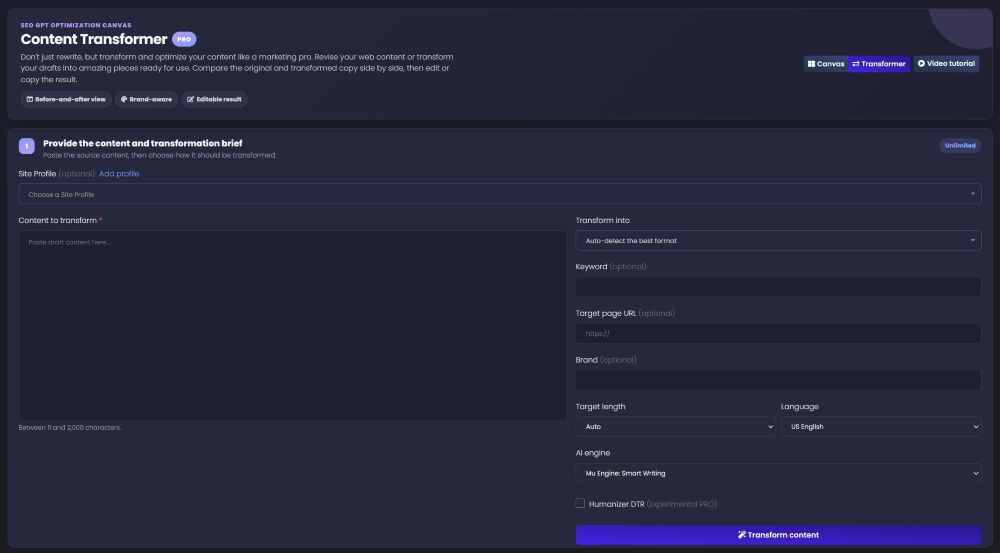
Paste your existing copy into Content to transform. Add an optional Site Profile when available in your account.
Use Transform into to select a format, or begin with Auto-detect the best format.
The optional Keyword, Target page URL, and Brand fields give your rewrite a clearer focus.
Set the Target length, Language, and available AI engine, then select Transform content.
The workspace shown includes Mu Engine: Smart Writing and a Humanizer DTR option labeled Experimental PRO. Available features, engines, and usage depend on your account.
More useful than another paraphrase
Start from your own copy, then adapt it for the page, channel, or audience you need to reach next.
Refresh
Rework a service description, product explanation, or page section. Bring the relevant keyword and destination page into the brief.
Repurpose
Repurpose a useful excerpt as a social post or another available content type, keeping the original message as your starting point.
Adapt
Make a version that fits a different space or audience using the target-length and language controls available in your workspace.
Review before you publish
Compare the original and transformed copy side by side, then edit or copy the result. Look for clearer meaning, a better fit, and a next step your reader can understand.
Source copy
“We offer website audits. We check your website and send a report listing issues. You can contact us to request an audit.”
A clearer direction
“Know which issues are on your website. Get a website audit with a report your team can review. Request your audit.”
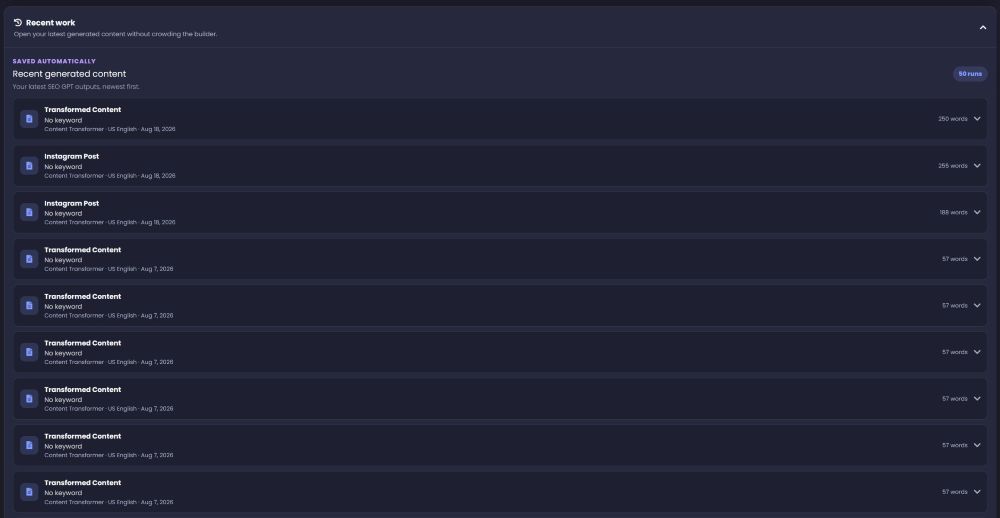
Automatically saved · Recent work
Return to recent generated content without crowding the builder. The history keeps your latest SEO GPT outputs together, newest first.
Part of the SV workflow
Use Content Transformer when you already have copy. Start with Canvas for new page content, Prose for article depth, or SEO Strategist for optimization priorities.
Arrange new page content and generate related pieces from a shared brief.
Explore Canvas Develop the full articleCoordinate perspective, research, structure, writing, and validation in an article workflow.
Explore Prose Decide what to improveUse competitive comparisons and page-level recommendations to prioritize optimization.
Explore SEO StrategistManaged campaigns are separate services. They combine content with ongoing analysis, optimization, and campaign delivery.
Before you get started
Content Transformer is SV’s AI content rewriting and repurposing workspace inside SEO GPT. Start with existing copy, choose how it should change, add relevant context, and review the transformed version alongside the original.
You can create a free SV account to get started. Feature access, available engines, and usage allowances depend on your plan. The screenshots on this page show a PRO workspace; they do not represent the features included in every account. Check the options available in your dashboard.
Canvas is for building new page content from a shared brief and arranging it into related blocks. Content Transformer starts with copy you already have and helps you rewrite, translate, or adapt it while keeping the original in view.
Yes. Keyword, Target page URL, and Brand are optional fields in the transformation brief. The workspace also shows an optional Site Profile selector. Add the context that matters for your task; you do not need to fill every optional field.
Yes. Choose an output format or use Auto-detect the best format. Target length and Language controls let you shape the result using the options available in your account. The AI engine is also selectable where your plan allows it.
You can compare the original and transformed versions, edit the result, and copy it for use in your publishing workflow. Recent Work automatically saves recent generated content and lets you reopen entries. Review important facts and wording before publishing.
No. Use Content Transformer to improve the clarity and relevance of your copy, not as a ranking guarantee. Search performance also depends on the page, site, competition, and implementation. Review the result for accuracy, usefulness, and search intent.
Put your existing content to work
Bring one piece of copy. Give it a clearer purpose. Make the next version one you can use.