[email protected]
1-800-398-5212


SV TOOLS AI KEYWORD RESEARCH
Know what to target. Know what to do next.
Discover relevant keywords, compare Google-data metrics and O-Scores, and move from a promising search term to topics, SEO strategy, website mapping, or content.
Already have an account? Sign in
Free account available. The examples below show the PRO interface.
Research with a next step built in.
THE REPORT, NOT JUST THE PROMISE
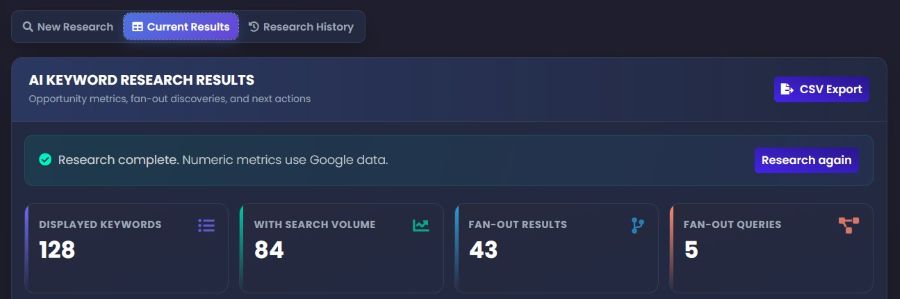
See the research totals, compare original and fan-out discoveries, and review the terms worth a closer look. Numeric metrics use Google data.
These are the totals in the example below—not plan allowances or guaranteed results.
01 DEFINE THE RESEARCH
Enter your base keywords or phrases. Add business context, then choose the purpose and market for your research.
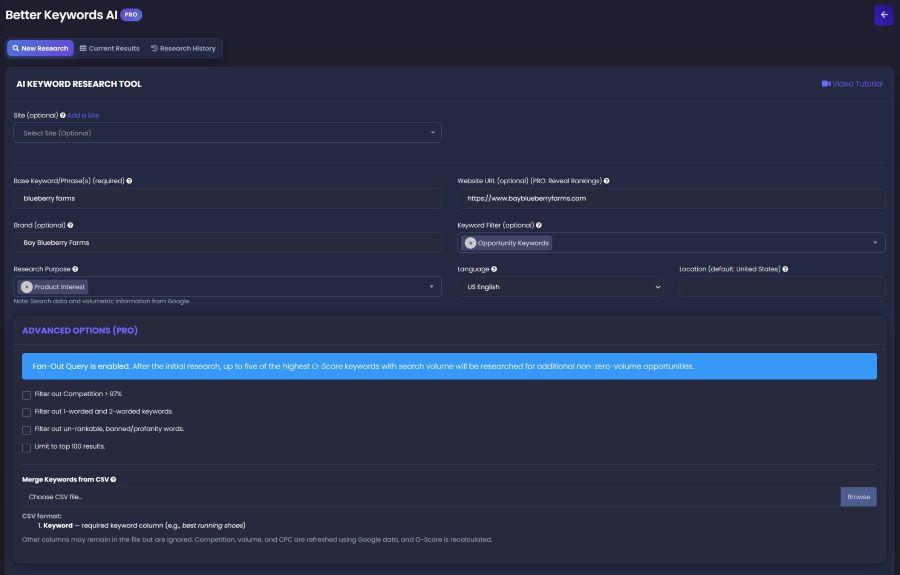
02 FOLLOW THE OPPORTUNITY PRO
Fan-Out Query researches up to five high-O-Score keywords with search volume from the initial results, looking for additional non-zero-volume opportunities.
Keep the original research and expanded discoveries together, with separate totals for fan-out queries and results.
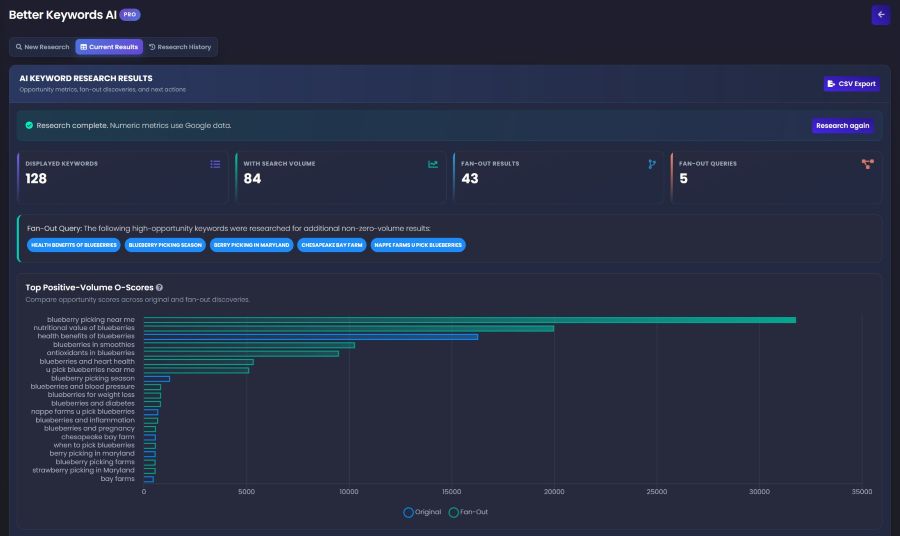
03 COMPARE THE OPTIONS
The Top Positive-Volume O-Scores chart compares original keywords with fan-out discoveries. Use it to find candidates for a closer review—not as a promise of rankings.
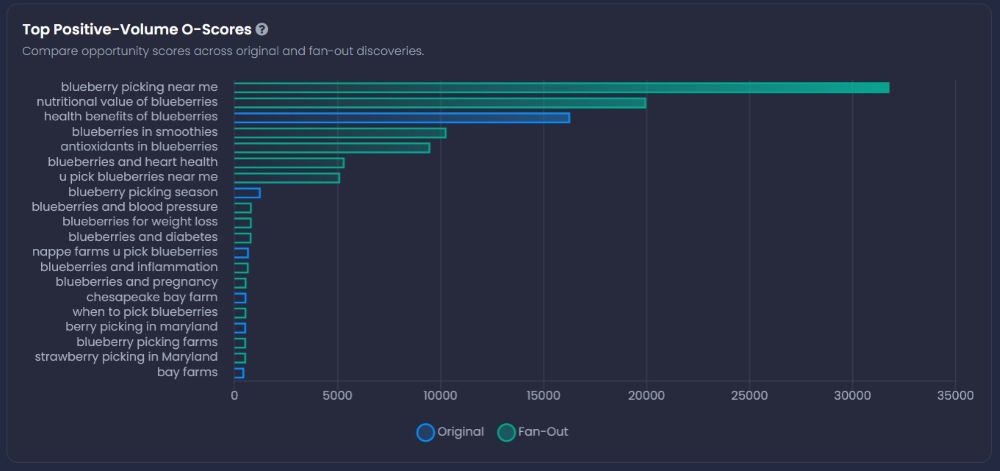
Choose with context. Check the keyword’s intent, relevance, search volume, CPC, and Competition alongside its O-Score.
04 MAKE THE NEXT MOVE
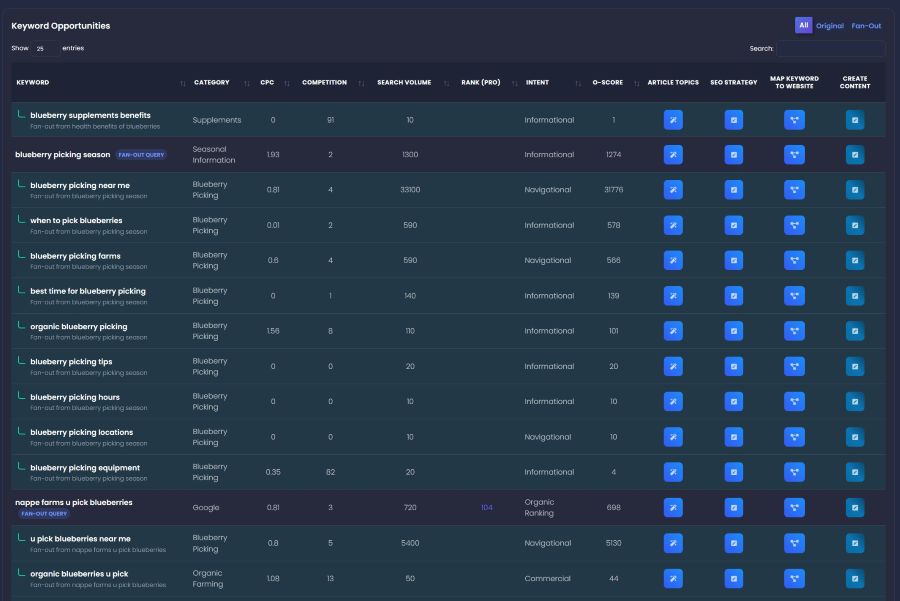
Filter All, Original, or Fan-Out results. Compare category, CPC, Competition, volume, intent, O-Score, and PRO ranking information—then choose a next action from the keyword’s row.
KEEP THE RESEARCH MOVING
Use existing research as a starting point instead of building every keyword list from scratch.
SEE THE WORKFLOW
Follow the walkthrough, then explore the report views above as you prepare your own keyword research.
Start with a topic and a target market.
Compare relevant terms and their metrics.
Plan topics, strategy, page mapping, or content.
From a starting phrase to a research workflow.
BEFORE YOU BEGIN
Better Keywords AI is an AI keyword research tool in the SV dashboard. It brings keyword discovery, opportunity comparisons, and next-action controls into a research report you can use for SEO and content planning.
Yes. You can create a free SV account. The screenshots on this page show the PRO interface. PRO-labeled capabilities include ranking lookup, fan-out research, advanced options, and CSV merging. Review your dashboard for current plan access and usage allowances.
Yes. The research form includes language and location settings, along with a research purpose and optional keyword filter. Base keywords or phrases are required; site and brand context are optional.
After the initial research, Fan-Out Query follows up to five of the highest O-Score keywords that have search volume to look for more non-zero-volume opportunities. The report distinguishes Original and Fan-Out results and identifies the parent queries.
O-Score is the tool’s opportunity-prioritization metric. The report includes an O-Score column and a Top Positive-Volume O-Scores chart. Use it alongside intent, business relevance, volume, CPC, and Competition—not as a ranking guarantee or traffic forecast.
The current results screen states that numeric metrics use Google data. The report’s field is labeled Competition; it should not be presented as a guaranteed measure of how easily your website will rank organically.
The PRO CSV merge requires a Keyword column. Extra columns can remain in the file, but are ignored. The tool refreshes volume, CPC, and Competition using Google data and recalculates O-Score, rather than carrying over those imported metrics unchanged.
The setup screen shows options to exclude Competition above 97%, exclude one- and two-word keywords, filter un-rankable or banned/profanity terms, and limit the output to the top 100 results. These are selectable controls, not promises that every returned term will rank.
The interface includes CSV Export, Research History, and Research again. These give you ways to take results into your own workflow, return to research, or run it again.
The report provides controls for Article Topics, SEO Strategy, Map Keyword to Website, and Create Content. Choose the workflow that fits your next task. A keyword research result is a starting point for that work—not an automatically published page.
YOUR NEXT PAGE STARTS WITH A BETTER KEYWORD
Give your next SEO or content decision a clearer starting point with Better Keywords AI.
Free account signup. PRO capabilities and usage depend on your plan.