

AI search is changing how people discover brands. Instead of “10 blue links,” users increasingly see AI-generated answers (Google AI Overviews, ChatGPT-style assistants, Perplexity-style answer engines). If your brand isn’t mentioned, cited, or recommended inside those answers, you’re invisible—even if you rank well.
Table of Contents
This guide shows you exactly how to run a GEO Audit using SEO Vendor’s GEO Audit Tool, interpret the report, and turn it into an execution plan that improves AI Brand Visibility.
What is a GEO Audit?
A GEO Audit (Generative Engine Optimization Audit) evaluates how well your website is prepared to:
- Be understood correctly by AI systems
- Be trusted as a source worth using
- Be cited across the web (third-party proof that AI engines often reference)
A GEO Audit is not “SEO 2.0.” It’s a practical process to make your content extractable, your brand verifiable, and your footprint citation-ready.
Who this guide is for
- Agencies running GEO as a new service line
- Local service businesses (law firms, home services, medical clinics)
- SaaS brands competing for “best / alternatives / comparison” prompts
- Anyone trying to increase brand mentions inside AI answers, not just traffic
The GEO Audit workflow (end-to-end)
Here’s the workflow you’ll repeat every month or quarter:
- Run a GEO Audit (this tool) to diagnose content + trust + citation readiness
- Open RankLens to benchmark “what AI engines say today” and measure change
- Open Preliminary Audit to confirm technical access (crawlability, rendering, etc.)
- Implement the report’s prioritized changes
- Re-test (RankLens + GEO Audit) and iterate
Step 1: Set up your GEO Audit correctly
Before you click “Run,” your inputs determine how useful the report will be.
Required inputs
- Primary domain
- Canonical brand name (exact spelling you want AI to repeat)
- Target location (for local businesses)
- Scope: Full site vs a specific page set
Strongly recommended inputs (for best mapping + prioritization)
- Primary services / offers (the money-makers)
- Competitor list (5–20)
- Brand variants (common misspellings, old names, abbreviations)
- Optional datasets (if available):
- Search Console export (queries → pages)
- Analytics export (conversion pages / engagement)
- Backlink or mention export
Tip: If you’re local, lock your audit to the real service area (city/region). GEO is extremely sensitive to location intent.
Step 2: Read the Score Snapshot first (your “where to focus” indicator)
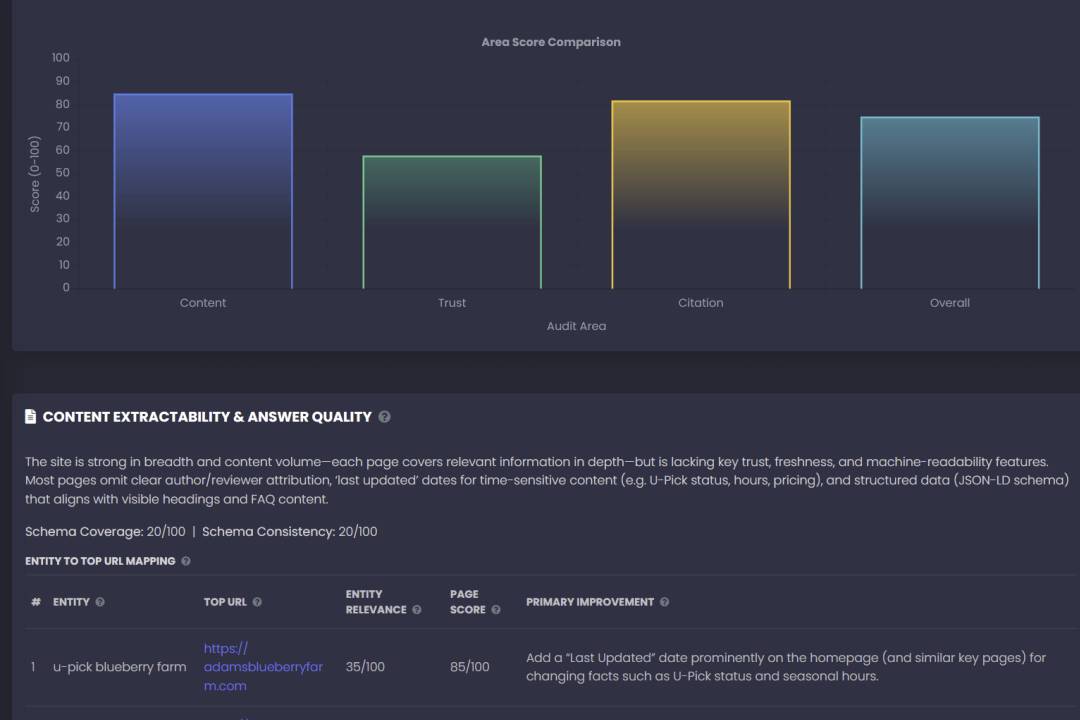
At the top of the report you’ll see:
- Content Extractability Score
- Trust & Entity Clarity Score
- Citation Surface Score
- Overall GEO Score
How to use this like a pro
- The fastest gains usually come from improving your lowest score first.
- If your Overall score is “stuck,” it’s because one of the three core scores isn’t moving.
Common patterns
- High Trust + Low Content → your brand is credible, but pages are hard to quote
- High Content + Low Citation → your site is good, but competitors have more third-party proof
- Low Trust → you’re missing governance, proof assets, author clarity, or NAP consistency
Step 3: Fix Content Extractability & Answer Quality (the highest-leverage section)
This is where GEO wins happen. AI systems don’t “rank” your page—they extract from it.
A) Use “Entity to Top URL Mapping” to identify what page should win each intent
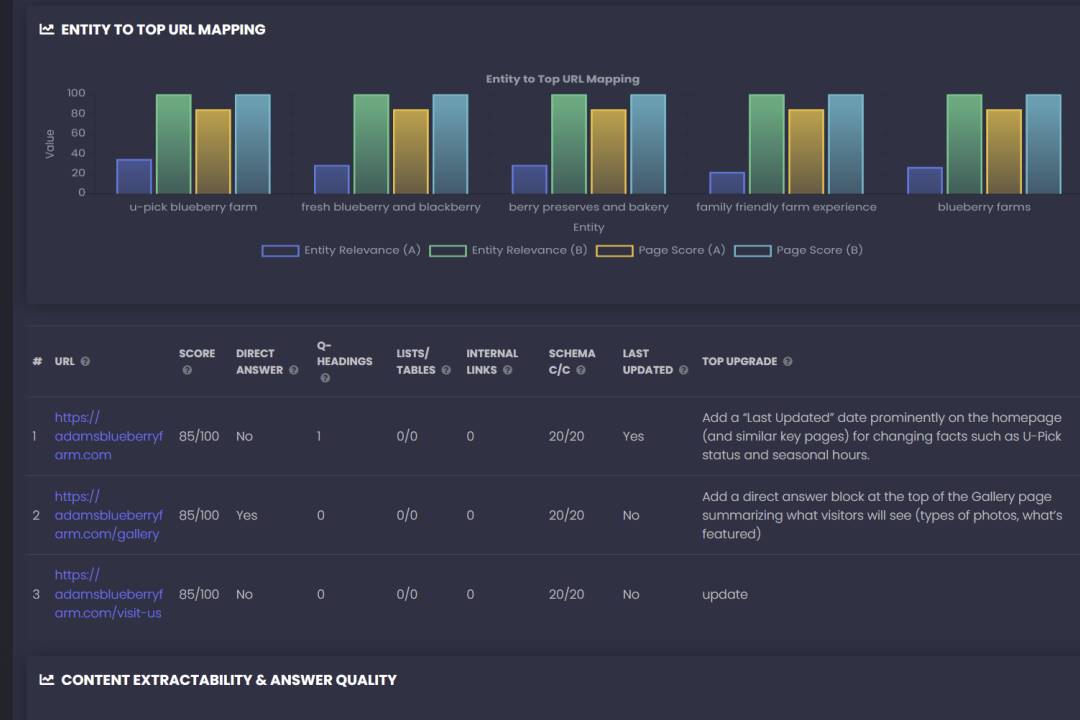
This table shows:
- Entity (target phrase / intent)
- Top URL (the page selected as best match)
- Entity Relevance (how strongly that page matches)
- Page Score (readiness and structure)
- Primary Improvement (the #1 change that will move the needle)
What you do with it
For each entity:
- Click the Top URL
- Implement the Primary Improvement
- If relevance is low (example: < 40/100), do one of these:
- add a direct answer block using the entity language
- tighten headings to match common prompts
- create a dedicated page if the intent is business-critical
B) Improve the page using the report’s “Direct Answer / Q-Headings / Lists / Links” checklist
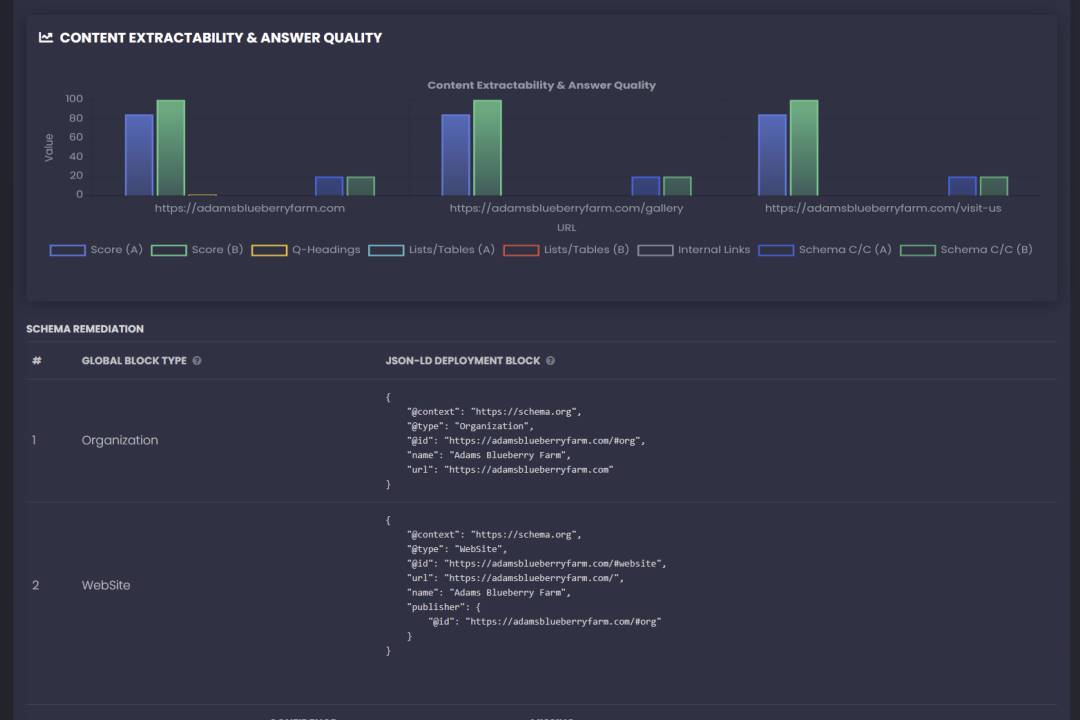
When users ask AI a question, the best-performing pages tend to have:
1) A direct answer block (above the fold)
Add a 2–4 sentence answer that:
- defines the topic plainly
- includes location/service scope if relevant
- includes a “next step” line
2) Question-style headings (H2/H3)
Turn real prompts into headings:
- “How long do I have to file a claim in Louisiana?”
- “What happens during a free case evaluation?”
- “What evidence matters most after a crash?”
Answer each in 2–6 sentences.
3) Lists and at least one table
Tables are “AI-friendly” because they’re structured and comparable:
- crash scenario types
- evidence checklist
- timeline/process steps
- “car vs truck accident differences”
4) Internal linking to sub-intent pages
Your best pages should link to:
- deadlines/statutes
- costs/fees
- proof/results
- FAQs and deeper explainers
This helps AI systems understand topical coverage and keeps human visitors engaged.
5) Freshness and authorship
For YMYL niches (legal/medical/finance), add:
- last updated date
- author/reviewer identity
- links to credentials or registries where appropriate
Step 4: Deploy Schema using “Schema Remediation” (fast, scalable improvements)
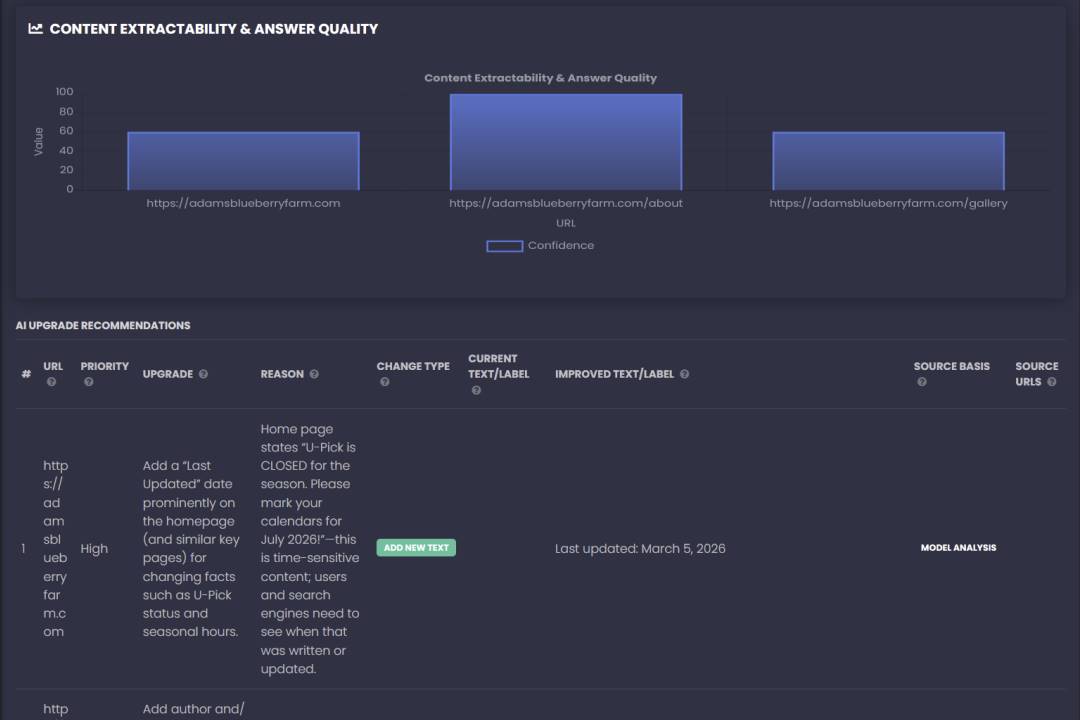
Schema isn’t magic. But it’s one of the fastest ways to improve:
- machine understanding
- entity consistency
- “who published this / who wrote this” clarity
A) Start with the global blocks (sitewide)
Your report generates “Global Block Type” JSON-LD blocks like:
- Organization
- WebSite
Deploy these once in your global template (header/footer injection).
B) Deploy per-template schema blocks
Then use the report’s per-URL / template table to deploy:
- WebPage
- BreadcrumbList
- Service (for service pages)
- Article/BlogPosting (for blog posts)
- FAQPage (only if the FAQ exists on-page)
Non-negotiable schema rules
- Don’t emit multiple conflicting Organization blocks from plugins + custom code
- Schema must match visible content (author name, dates, FAQ text)
Step 5: Fix Trust & Entity Clarity (make your brand “verifiable”)
AI engines commonly pull brand facts from multiple sources. If your identity is inconsistent, AI answers become inconsistent.
Use the Trust table to fix:
- missing governance documents (Terms/Cookie/Editorial Guidelines when applicable)
- incomplete author/attorney bios
- unclear address/phone/service area signals
- weak proof assets placement (awards, reviews, case results, credentials)
The highest ROI trust upgrades
- Put your strongest credibility signals near the top of key pages:
- years in practice / experience
- recognitions (only credible ones)
- review summary (real count + platform)
- proof assets (case outcomes where allowed)
Step 6: Build your Off-site Citation Surface (why competitors get cited)
In AI answers, third-party sources are often treated as “validation.” That’s why competitors with stronger directory/review/media footprints get referenced.
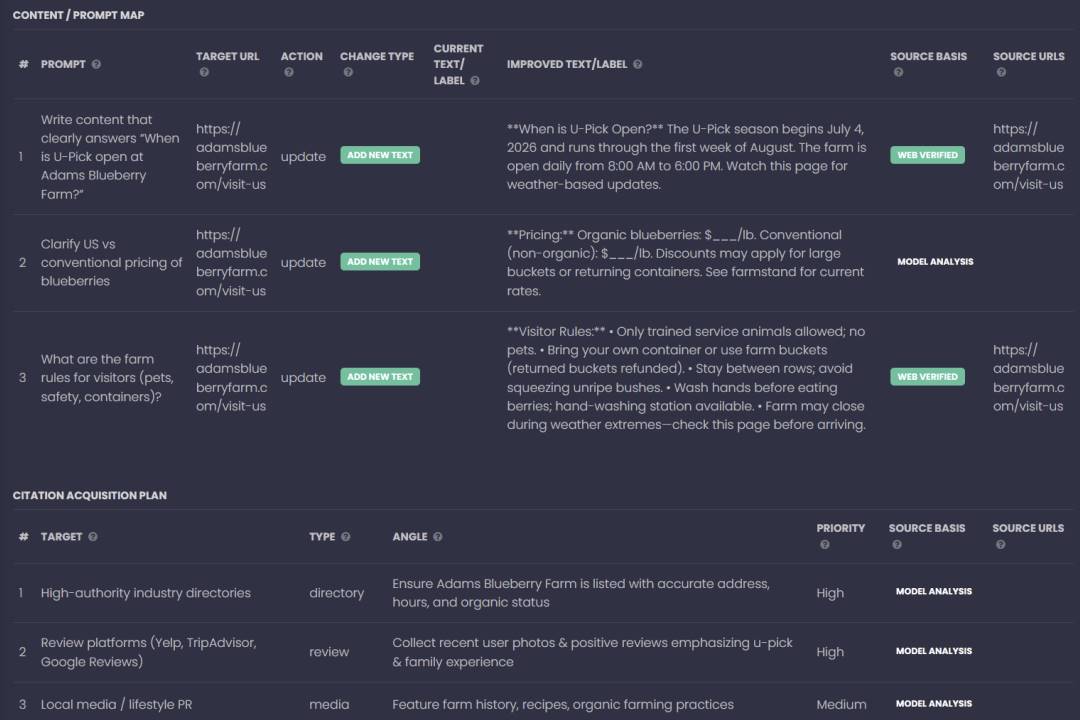
Use the report’s:
- Citation Acquisition Targets
- Competitor Citation Patterns
- Citation Acquisition Plan
What to execute first
- Claim/update major profiles with canonical brand info:
- name, address, phone, categories, services, service areas
- Grow review volume ethically and consistently
- Earn media mentions using “citation-ready” assets:
- unique data, local reports, checklists, legal commentary, benchmarks
- Participate in community Q&A where your audience asks questions
- answer clearly, link to the best canonical explainer page
Step 7: Use the Prioritized Roadmap like a sprint plan
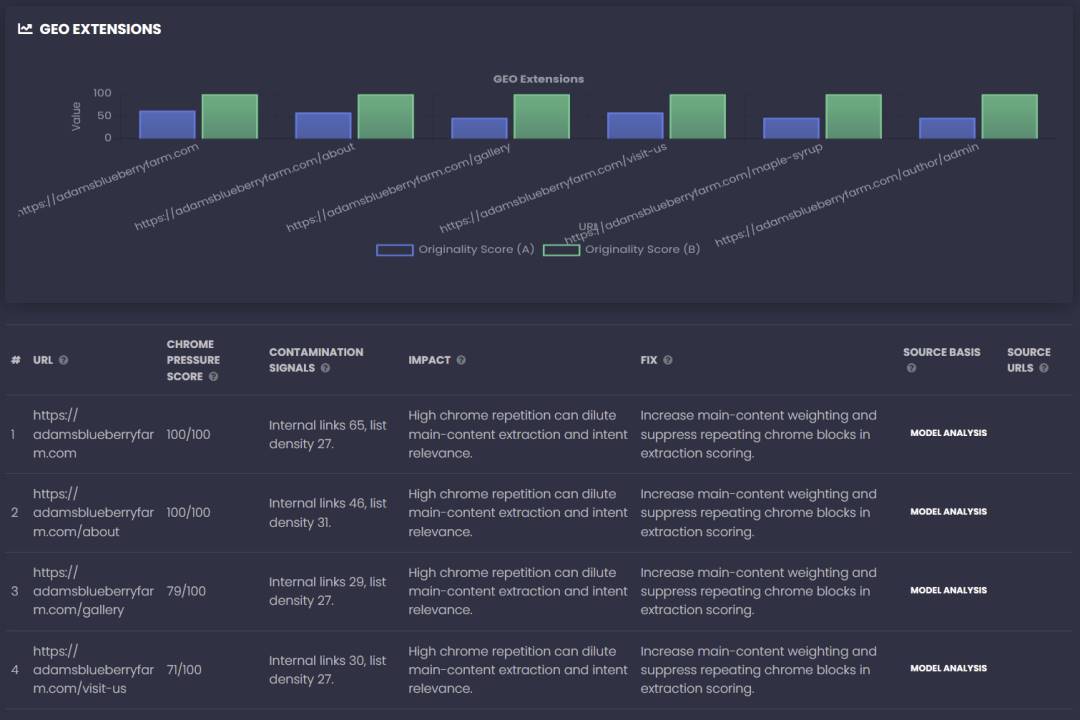
The report gives you:
- Top 10 Quick Wins
- Content / Prompt Map
- Schema Implementation Tickets
- A timeline roadmap (Weeks 1–2 / 0–30 / 30–90 / 90–180)
Recommended execution order
Weeks 1–2
- Deploy global schema + template schema tickets
- Fix the top mapped “money pages” (direct answers + headings + lists + proof)
Next 0–30 days
- Expand coverage on the top service pages (scenarios, evidence, steps, FAQs)
- Add proof blocks (case results, outcomes, awards) where allowed
- Publish missing governance pages
30–90 days
- Execute citation acquisition: directories, reviews, media, community
- Build internal link architecture around high-intent pages
90–180 days
- Expand into deeper topic clusters and comparison assets
- Run conversion experiments (trust placement, CTA placement)
Step 8: Re-test and measure AI Brand Visibility changes
Use:
- RankLens for the external benchmark (mentions/citations/accuracy across engines)
- This audit report to confirm the on-site and off-site readiness scores are improving
What to track
- AI mentions: how often you show up in answers
- AI citations: whether you’re linked as a source
- Accuracy: whether AI summarizes your brand correctly
- Conversion: calls/forms/trials as visibility increases
Common pitfalls (and how to avoid them)
“We optimized the homepage and nothing changed”
Homepages are usually hubs. GEO wins often come from improving the best intent-specific service or explainer page, then linking to it prominently.
“We added FAQ schema, but there’s no visible FAQ”
Don’t do that. It creates trust issues. The FAQ must exist on-page and match the schema.
“We have great content, but competitors get cited”
That’s usually a citation surface problem:
- Competitors have more reviews, directory dominance, case results visibility, or media coverage.
FAQ (for SEO + featured snippet opportunities)
What is Generative Engine Optimization (GEO)?
GEO is the practice of optimizing your brand and content so AI systems can understand, trust, and cite you in AI-generated answers.
How is a GEO Audit different from an SEO Audit?
SEO audits focus on rankings and crawl/index factors. GEO audits focus on extractability, trust/entity consistency, and off-site proof that influences AI answers.
Does schema matter for GEO?
Yes—schema helps with entity clarity and extractable structure—but it only works if it matches visible page content and uses consistent brand identity.
How often should I run a GEO Audit?
Monthly for competitive niches, quarterly for stable niches, and any time you make major site/content changes.
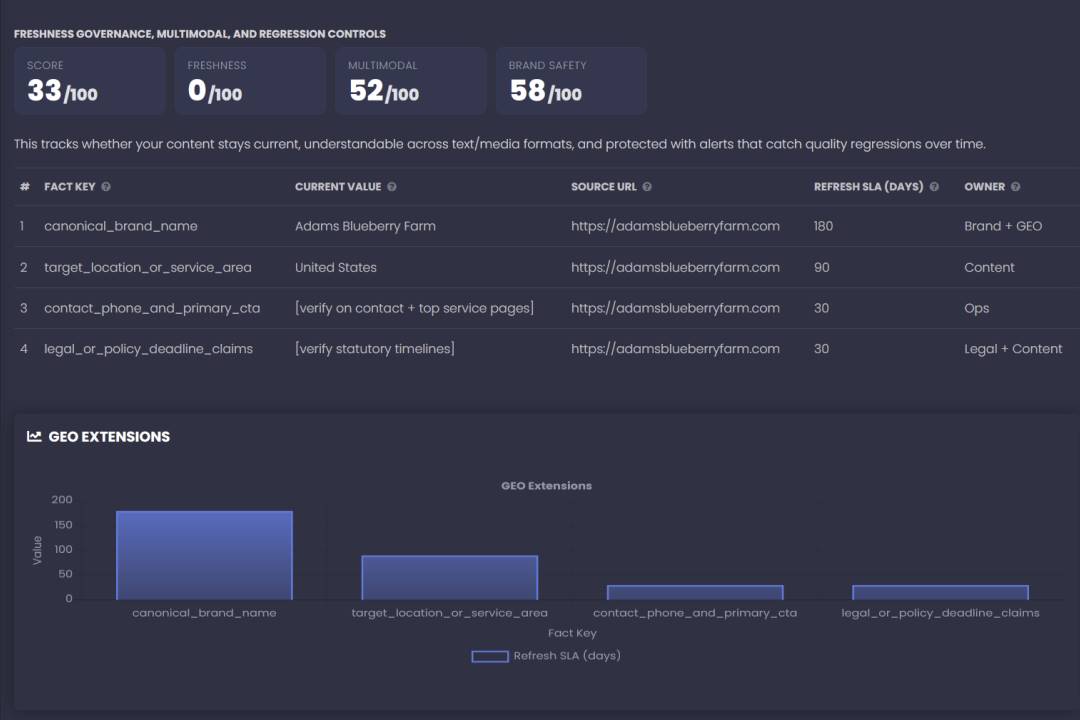
If you want to increase AI Brand Visibility, don’t guess. Run the GEO Audit, follow the prioritized roadmap, and re-test in RankLens to measure impact.
Next step: Run your first GEO Audit and fix the top 3 “High priority” items this week.